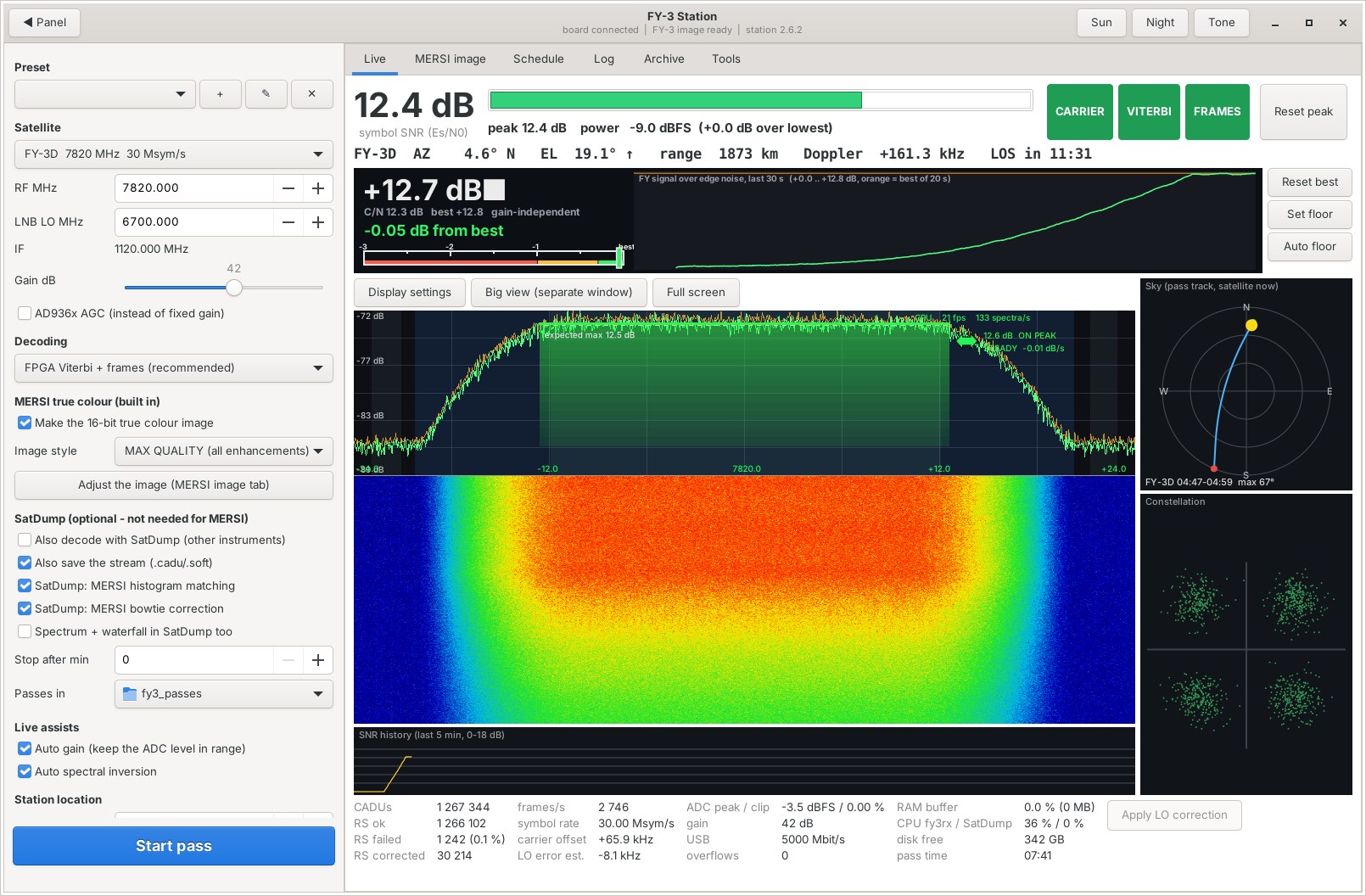
FengYun-3 X-band, live. Demodulated and Viterbi-decoded inside the SDR's FPGA.
A hand-aimed 90 cm dish, a self-made CNC feed, a DIGITELEKTRO LNA and downconverter and a HamGeek LibreSDR B210 —
and a complete FengYun-3 receiver living in the radio's Artix-7. The laptop gets finished frames and turns them into 250 m images
while the satellite is still in the sky.
Start a passone button — or let the schedule record passes automatically
16
Sun · Night · Tonereadable in direct sunlight, dark-adapted red at night, a tone to aim by ear
01
Receiving workflow
The roof station
1 / 7
The chain at a glance
From the sky to a 16-bit image
A 90 cm dish, aimed by hand. A feed machined on a CNC. A low-noise amplifier and downconverter from DIGITELEKTRO. A HamGeek LibreSDR B210 whose FPGA does the heavy lifting. An Ubuntu laptop that turns finished frames into images while the satellite is still in the sky.
The laptop under the dish struts, sun mode on, the FengYun-3H signal block standing about 13 dB out of the noise — then, minutes after LOS, the archive entry and the finished 250 m image.
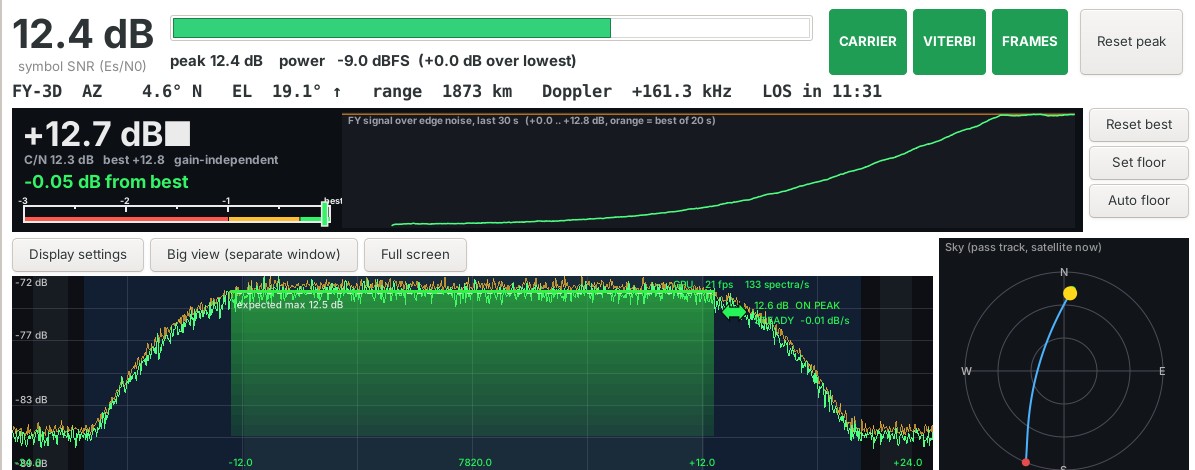
Live: symbol SNR, aim meter, range and Doppler, LOS countdown, CARRIER · VITERBI · FRAMES
After LOS: the pass in the archive and the MERSI-3 image ready to adjust
No SatDump needed for the image — it is made by the station itself
Real footage from the roof · FY-3H pass, 15 Nov 2026
Dish & CNC feed
90 cm of dish, 3 degrees of beam
At 7.79 GHz a 90 cm dish has roughly 35 dBi of gain — and a beam only about three degrees wide. That is what makes a hand-aimed X-band station both possible and a real sport.
The feed is the station's own design, machined on a CNC: it sets the illumination of the dish, the circular polarisation and how well the dish rejects the warm ground around it. Every tenth of a dB here shows up directly in the SNR meter.
With a three-degree beam the pointing tolerance for 1 dB of loss is only about ±0.9°. The app gives you an aim zone, a trend arrow and a tone so you can stay inside it by hand — see Hand tracking.
The 90 cm dish on a camera tripod with a pan-tilt head, feed arm, LNA and the laptop hanging belowThe self-made CNC-turned stepped horn feed, seen from the dish
DIGITELEKTRO LNA & downconverter
Low noise first, then down to L-band
Directly behind the feed, a DIGITELEKTRO low-noise amplifier sets the noise figure of the whole station; its downconverter shifts the 7.8 GHz downlink to an IF the SDR can tune.
The app shows RF, LO and the resulting IF side by side, warns when the IF would leave the AD9361's 70 MHz – 6 GHz range, and estimates the LO error of the downconverter from the measured carrier offset against the predicted Doppler — one click applies the correction.
Spectral inversion (from high-side LOs) is detected and corrected automatically.
DIGITELEKTRO X-Band LNA v3 on the CNC feed, downconverter further down the arm
HamGeek LibreSDR B210
The radio with a brain: LibreSDR B210
A B210-compatible board with a bigger FPGA: AD9361 transceiver, Artix-7 XC7A100T and a Cypress FX3 for USB 3. FY3magic puts a complete FengYun-3 receiver into that FPGA — next to the stock radio, which keeps working.
The FY-3 image is loaded into the FPGA's RAM over USB — the board has no flash to wear out and nothing to brick. A power-cycle always returns to whatever image UHD loads.
FengYun-3 flies at about 836 km. The slant range grows from 836 km overhead to almost 2900 km at 5° elevation — 11 dB of extra path loss between zenith and the horizon.
Slant range at elevation ε (R = 6371 km, h ≈ 836 km)
Free-space path loss
Carrier-to-noise density
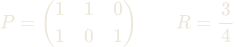
Symbol and bit energy (QPSK, rate 3/4)
Decode threshold
≈ 5 dB Es/N0, error-free after lock from ≈ 6 dB
Typical pass peak
11 – 13 dB Es/N0
Occupied bandwidth
Rs (1 + α) = 38.4 × 1.35 ≈ 52 MHz (RRC, α = 0.35)
Eyes, ears, arms
Tracking a satellite by hand
Overhead, FengYun-3 crosses the sky at about half a degree per second. With a three-degree beam you have roughly three seconds before the signal is gone. The station is built around that closed loop: ear, hand, dish, meter.
Aim zone on the flat top of the 52 MHz signal block: green on the best level of the last 20 s, through orange to red
Trend arrow ‘DROPPING’ as soon as the level falls 0.1 dB/s — before you notice it
Tracking tone: pitch follows the signal, a chirp marks a new best — point by ear, eyes on the sky
Big view on a second screen, night-red mode for dark-adapted eyes, sun mode for daylight on the roof
Real FY-3D pass, 21 Nov 2026 — the aim zone flips from green to red and back as the dish is corrected by hand
02
The heart
Demodulator & Viterbi in the FPGA
1 / 9
245 MB/s in, 7 MB/s out
Why the FPGA does the work
Software receivers chew through 245 MB/s of raw IQ and lose samples whenever the laptop hiccups. FY3magic moves the whole physical layer into the LibreSDR's Artix-7: the PC receives finished, frame-synchronised CADUs — 7.2 MB/s, a thirty-fourth of the raw stream.
No dropped samples: the hard real-time part never touches the operating system
The laptop's CPU stays free for the live spectrum, the image preview and SatDump
Live spectrum, waterfall and constellation keep running even though USB carries only decoded frames
One FPGA image covers FY-3D, E, F, G and H — the symbol rate is just a setting
A new concept for amateur X-band: hardware demodulation and channel decoding inside an affordable SDR.
The demodulator runs at one complex sample per clock at the radio clock. It turns the 61.44 Msps IQ stream into soft QPSK symbols: automatic gain, root-raised-cosine matched filtering, symbol timing recovery, carrier recovery.
A new concept: the demodulator works at a fractional oversampling of only 1.6 samples per symbol, at the radio's native clock — so a single FPGA image serves every FengYun-3 symbol rate.
Root-raised-cosine pulse (α = 0.35), Nyquist after matched filtering
Fractional oversampling
Gardner detector · interpolation · loop
Symbol timing recovery
The symbol clock of the satellite and the SDR's sample clock never agree exactly. A timing loop interpolates the samples at the exact symbol instants and at the half-way points between them.
Verified bit-true: no cycle slips from 4 dB Es/N0 up with ±200 ppm symbol-clock error.
Doppler, LNB drift and the downconverter's LO error put the carrier somewhere within a few hundred kHz. A frequency-locked loop pulls it in, a Costas loop locks the phase — the four QPSK clouds stand still.
Carrier range: ±2.4 MHz. Simulated without a single cycle slip at 20 MHz/s Doppler ramps — ten thousand times the real worst case of about 1.7 kHz/s.
QPSK leaves a 90° phase ambiguity after the loop locks. FengYun-3 handles it with differential coding, and the FPGA resolves the rest on its own (next chapter).
Costas QPSK phase detector
Fourth-power frequency detector (modulation removed)
Locked QPSK constellation in the FY-3 Station live view
Depuncturing · K = 7 · rate 3/4
Two Viterbi decoders in hardware
FengYun-3 protects its data with the CCSDS K = 7 convolutional code, punctured to rate ¾, on both QPSK branches. FY3magic runs both Viterbi decoders inside the FPGA — one trellis step per clock, soft decisions, in real time.
Before a decoder can work it must know where the puncturing pattern starts, which decoder output comes first and whether the bit stream is inverted. A new concept here: the FPGA works all of that out by itself — node synchronisation in hardware, no help from the host, re-acquired within milliseconds after a fade.
Erasures from the puncturing carry no weight in the metrics, exactly as in a software decoder — so the FPGA reaches the same threshold as SatDump's own decoder.
After the Viterbi decoders, FengYun-3's differential coding is undone and the stream is searched for the CCSDS attached sync marker. Out come 1024-byte CADUs — exactly what a software decoder would produce.
Sync on the normal and the inverted marker — the 180° ambiguity costs nothing
Flywheel: a frame that arrives a little damaged is still delivered in place, so no scan line slides
Lock times measured end-to-end: about 1.5 – 4.5 ms from noise to frames
Hand tracking needs a spectrum and a constellation — but in frame mode USB carries no raw IQ. The FPGA therefore takes short snapshots of the raw input and of the demodulated symbols and slips them in between the frames.
About 130 – 230 snapshots per second (depending on the satellite's rate): spectrum, waterfall, signal power, constellation, SNR
No frame word is ever lost or reordered for a snapshot
The same snapshots drive SatDump's own spectrum window if you want it open
GPU-drawn spectrum and waterfall at your display's refresh rate
Live spectrum, waterfall and constellation from FPGA snapshots
Simulation · emulation · real passes
Verified bit-true, then on the roof
Every block was simulated bit-exact against impaired FengYun-3 signals built from SatDump's own encoder, then decoded by SatDump itself — before the first real pass.
The FPGA image is loaded into RAM over USB at every start. Both EEPROMs are only ever read. A power-cycle always brings the board back to the image UHD loads.
Before anything is changed: a read-only dump of both EEPROMs (FX3 boot EEPROM and FPGA-side EEPROM), verified
Hardware tests run with the FY-3 image in RAM only — UHD's own image stays untouched; without FY-3 Station the board behaves like a stock B210 (SatDump, SDR++ and UHD work as before)
Every replaced file is backed up with a checksum; ‘Restore original UHD image’ puts it back at any time, verified
All-in-one: the B210 FPGA image is delivered with the app as one locked asset — setup, hardware tests and revert to the original functions are in FY-3 Station → Tools
‘Verify EEPROMs unchanged’ re-reads both EEPROMs and compares them with the first backup
On the laptop the CADUs are derandomised, Reed-Solomon corrected and sorted by virtual channel — MERSI to the image engine, everything (optionally) on to SatDump for the other instruments.
Frames the Reed-Solomon code cannot repair are not simply thrown away: a new concept recovers the usable part of them. On deliberately damaged test data that roughly halved the image error.
Repeated and missing frames are detected from the frame counter, so a lost frame never shifts the rest of a scan line.
MERSI-3 (FY-3F, FY-3H) and MERSI-II (FY-3D) sweep a 2900 km swath with a rotating mirror. Every 1.5 s one scan lays down 40 lines of 250 m pixels in the visible, near-infrared and two thermal bands.
Towards the swath edges the footprints grow and consecutive scans overlap — the classic bow-tie. Uncorrected, MERSI images show doubled coastlines, seams every 40 lines, stripes and a staircase from the Earth turning under the satellite. The engine removes all of it — with new concepts that keep the image organic: no blocking, no seams, nothing that looks processed.
Ground speed and scan length
Bow-tie: footprint growth with scan angle θ (flat-Earth approximation)
MERSI-3 at 1:1, 250 m per pixel: Mallorca and Menorca, FY-3H 12 Nov 2026
The flagship image
True colour, 16 bit, 250 m
Bit-identical raw counts, cleaned and assembled with the station's own image engine: an 11 600-pixel-wide, 16-bit-per-channel true-colour image, made automatically after LOS.
Stripes, seams and bow-tie overlap removed; bands registered to each other
Physical swath-edge haze removal, HDR highlights with cloud texture, a deep blue sea
Fractal detail growth: a new concept that restores what resampling softens — on textured land only, never on clouds or sea
Soft-cloud protector keeps small clouds and cloud edges natural
Image styles: MAX QUALITY, Natural, Vivid, HDR, Plain — or your own, with live preview
FengYun-3 MERSI true colour: the central Mediterranean from Tunisia to Crete, the terminator glowing on the right
Orbit · scan geometry · coastline fit
GEODESQUEEZE: true proportions
Every pixel is placed on the Earth from the satellite's orbit and the scan geometry, the model is fitted to the real coastlines in the pass, and the image is resampled to 250 m in both directions — shapes and angles true, like a Sentinel-2 tile.
At night there is no visible coastline. A new workaround finds the coast in the thermal infrared instead, so night passes land on the map to the pixel as well.
Outputs: GeoTIFF tags (QGIS / GDAL place the image), a Google Earth KMZ, a coastline + grid overlay and corner coordinates in the JSON next to the image.
Fitted coastlines and 5° grid over the FY-3H true-colour image
10.8 µm at 250 m
Thermal infrared, cleaned to the last count
MERSI-3's 10.8 µm channel sees temperature at 250 m — day and night. Its raw lines are full of detector, mirror and scan artefacts; FY3magic aligns, levels and destripes them until the image reads like one continuous photograph.
Look 1 — ESA / EUMETSAT, old-map sepia: cold cloud tops range-compressed, never glaring white, every surface with its own relief
Look 2 — SatDump ‘10.8 µm Thermal IR’, made exactly like SatDump's MERSI preset
Look 3 — SatDump ‘NO enhancement’ colour table
Sliders for tone, warm-end lift, regional contrast, fine texture and sepia strength
Thermal IR in the old-map sepia look, 1:1, Strait of Gibraltar at night
Sea-surface temperature at 250 m
Sea currents from space
Eddies, filaments, upwelling: the sea's own temperature range, spread over the full tone scale. At 250 m MERSI shows ocean structure that 1 km AVHRR images only hint at.
Sea-surface IR (grey) and SEA CURRENTS (colour) products
Clouds held back so they never drown the water's structure
Augmented, not repainted: the natural tonality of the infrared stays
Why tenths of a kelvin are visible: Planck radiance sensitivity
Sicily: visible, thermal IR, sea-surface IR and sea currents side by side
IR + coastlines + MWHS-2
Night passes, and storms from microwave
When the Sun is below the horizon the station makes a night image from the thermal channel: sea slate blue, land muted umber, clouds parchment veils. Rain and thunderstorm cells are coloured in from the microwave sounder on the same satellite.
A cold cirrus deck and a thunderstorm look alike in thermal IR. The MWHS-2 humidity sounder sees the difference: ice in deep convection scatters 150 and 183 GHz radiation away. FY3magic places those 15 km footprints on the 250 m image — light rain cyan-green, heavy orange, deep convection magenta — while brightness and texture stay those of the 250 m thermal image.
SNR in big digits, CARRIER / VITERBI / FRAMES lights, a GPU spectrum with the satellite's band, a two-minute waterfall, the constellation, five minutes of SNR history — and every counter that matters.
Frames, Reed-Solomon OK / failed / corrected, USB rate, RAM buffer, CPU, disk
Warnings with the likely cause (clipping, no lock, buffer)
Live controls: gain, AD936x AGC, spectral inversion, FLL, loop trims
Auto gain keeps the ADC between about −18 and −1 dBFS peak
The FY-3 signal is a flat 52 MHz block without a carrier line. The meter compares its flat top with the noise just outside it — gain-independent, so only pointing changes the reading.
Coloured aim zone: green on the best level of the last 20 s, yellow, orange, red as you drift off
Trend arrows with the rate in dB/s; ‘DROPPING’ appears before the zone changes colour
Expected maximum learned per satellite from your own passes
The next 36 hours of FengYun-3 passes over your station, with a polar plot for each. Tick the satellites and the app records on its own: it starts before AOS and stops after LOS.
TLEs from CelesTrak, refreshed every 12 hours and cached for offline use
Pointing line during a pass: azimuth, elevation, rising / falling, range, Doppler, LOS countdown
Desktop notification a few minutes before AOS
A manual start during a visible pass records until LOS — never cut short
Sun mode: black on white, readable in direct sunlight
Watch the image grow
The MERSI image tab
During the pass the image builds up scan by scan. After LOS the full 16-bit image is made automatically — then adjust it with live preview and re-render in seconds, no decoding.
Preview any product: true colour, night image, thermal IR, sea currents, NIR false colour
The 1:1 viewport is drawn first; while a slider moves it updates every 0.1 – 0.4 s
Image styles saved with the station preset; your own styles: save, rename, delete
North up, GEODESQUEEZE, area export, image from any .cadu (SatDump's too)
FY3magic makes MERSI images itself. Tick ‘Also decode with SatDump’ and the frames stream live into SatDump 2 as well — for MWHS-2, MWRI-2, MWTS-3 and every other instrument on board.
SatDump starts with its own separate settings — your normal SatDump configuration is never touched
SatDump's recorder spectrum can run from the FPGA snapshots, ~30 updates per second
Stopping a pass lets SatDump finish writing its products
The SatDump IR looks are available inside FY3magic too
Thermal IR preview in the SatDump 10.8 µm look inside the station app
05
Step by step
User guide
1 / 8
Ubuntu 24.04.x required · one command
Install
Requires Linux Ubuntu 24.04.x. Download the release zip, unpack it, open a terminal there and run the .run file with bash — it installs and sets up everything.
Make sure the computer runs Ubuntu 24.04.x (LTS) — this is required; other versions and distributions are not supported.
Download the release zip from Get it (agree to the Open Sky Pledge first).
Unpack the zip: right-click it → ‘Extract Here’.
Open a terminal in the unpacked folder: right-click inside the folder → ‘Open in Terminal’.
Run bash FY3-Station-2.7.1-setup.run - enter password when prompted.
The installer installs the tools, then makes a BACKUP: UHD's current FPGA image and firmware, and — with the board plugged in — a read-only dump of both EEPROMs.
It installs FY-3 Station with its B210 FPGA image — one locked, matched package — and runs the hardware tests with the FY-3 image loaded into the FPGA's RAM only.
Later, everything board-related lives in FY-3 Station → Tools: FPGA image setup, hardware tests, ‘Check installation’ and ‘Restore original UHD image’.
FY-3 Station opens — also in the applications menu and on the desktop.
cd ~/Downloads/FY3-Station-2.7.1-setup# the unpacked folder
bash FY3-Station-2.7.1-setup.run# = zip name without .zip, plus .run
All-in-one: the FY-3 FPGA image for the B210 ships inside the installer as one locked asset, matched to the app and its tools — nothing to build, nothing extra to install. B210 FPGA image setup, hardware tests and ‘Restore original UHD image’ all live in the app: FY-3 Station → Tools.
polarisation the right way round? LO / frequency? LNB supply (bias-T)? right satellite?
Clipping warning
lower the gain or let auto gain work
Carrier but no Viterbi
spectral inversion — corrected automatically after 8 s
RAM buffer filling
SatDump too slow: let FY3magic do MERSI, SatDump only when needed
Many RS failures at the horizon
normal below ~10°; the image engine recovers what agrees
Anything else
Tools → ‘Create feedback report’ and send the file
06
Received on the roof
Gallery
The central Mediterranean from Tunisia to Crete, evening terminator on the rightA jet-stream cirrus band over Crete and the DodecaneseSicily with Etna's plume drifting out to seaLibyan desert: circular irrigation fields and radial tracksSicily and the Maltese islands, sediment plumes along the south coastCrete and the southern Aegean islandsNile delta, Suez, Sinai and the LevantA storm over the central Mediterranean, the day–night terminator glowing amberCloud tops catching the last sunlight at the terminatorContrails and cumulus over dark waterSaharan wadis and escarpments meeting the seaFY-3H · 12 Nov 2026 · MERSI-3 true colour, western Mediterranean (GEODESQUEEZE)1:1 at 250 m — Mallorca and Menorca1:1 — Algerian coast and the Tell Atlas under cloud streetsArea export at 3× — Saharan AtlasGEODESQUEEZE: fitted coastlines and 5° gridFY-3F · 16 Nov 2026 · night pass in the muted night lookNight pass 1:1 — Strait of GibraltarThermal IR 10.8 µm, old-map sepiaThermal IR 1:1 — Guadalquivir, reservoirs, cloud streetsNight pass laid at 50 % over a map — coastlines on the pixelSicily: visible, thermal IR, sea-surface IR, sea currentsRain and storm cells from the MWHS-2 microwave sounder
07
Questions
FAQ
Which satellites can FY3magic receive?
FengYun-3F and 3H (main targets, MERSI-3, 38.4 Msym/s), FY-3E (38.4 Msym/s), FY-3D (MERSI-II, 30 Msym/s) and FY-3G (6 Msym/s). One FPGA image covers all of them.
What hardware do I need?
Linux Ubuntu 24.04.x is required on the computer. An X-band dish (90 cm works), a feed, an X-band LNA and downconverter to an IF the SDR can tune (70 MHz – 6 GHz), a HamGeek LibreSDR B210 and an Ubuntu computer with USB 3.
Can I track by hand?
Yes — the station is built for it. The beam of a 90 cm dish is about 3° wide and the satellite moves up to 0.5°/s, so the app gives you an aim zone, trend arrows and a tracking tone.
Why demodulate in the FPGA?
Raw IQ at 61.44 Msps is 246 MB/s; decoded frames are 7.2 MB/s. The real-time part never depends on the operating system, so no samples are dropped, and the CPU stays free for the live view and the images.
Do I have to build the FPGA image?
No. FY3magic is an all-in-one installation: the B210 FPGA image is delivered with the app as one locked, interdependent asset. Setting it up, testing the hardware and reverting the board to its original functions are all done from inside the app.
Is the FPGA image offered as a direct file or open-source download?
Not at this time. FY3magic is offered as a holistic solution: the FPGA image comes interlocked with the app and packaged in the installer only.
Can the board be bricked?
No. The FPGA image is loaded into RAM over USB, both EEPROMs are only read (and dumped and verified first), and every replaced file can be restored. A power-cycle returns the board to UHD's image.
Do I still need SatDump?
Not for MERSI images — FY3magic makes them itself. SatDump 2 runs side by side for the other instruments (MWHS-2, MWRI-2, MWTS-3, …) and receives the frames live.
How long until I have an image?
The image builds up live during the pass; the full 16-bit image follows a minute or two after LOS on a laptop.
What about night passes?
The thermal channel works day and night. Night passes get their own night image, are fitted to the coastline in the infrared, and can have rain and storm cells coloured in from the microwave sounder.
08
Release files · checksums · all pages
Get FY3magic
Release files
Downloads & SHA-256
Download active. Requires Linux Ubuntu 24.04.x ·
Download the release zip below.
Unpack it.
Open a terminal in the unpacked folder.
Run bash FY3-Station-2.7.1-setup.run — it installs and sets up everything (FPGA image, hardware tests, app).
Next release, in test: MetOp-B/C on PlutoSDR (ZynqSDR) and fast baseband decoding —
Every release file is listed here with its size and SHA-256 checksum, straight from the server. Drop a downloaded file
on the field below — it is hashed in your browser and compared, nothing is uploaded.
File
Size
SHA-256
Loading …
Verify a file drop it here or click
What you need: an X-band dish and feed, an X-band LNA + downconverter to 70 MHz – 6 GHz,
a HamGeek LibreSDR B210, a computer running Linux Ubuntu 24.04.x (required) with USB 3 — nothing else. The B210 FPGA image comes inside the all-in-one installer; setup, hardware tests and restoring the original image are done in the app.
Terms of use
The Open Sky Pledge
A gift from one rooftop to everyone who looks up. FY3magic is given freely. It exists to spread knowledge, to share the sheer technical wonder of pulling a satellite's voice out of the noise, and to carry the scientific community — and all of us — a small step further.
Free, and offered exactly as it is. It comes with no guarantee that it works, no promise of service, support, repair or redemption, and no liability or responsibility of any kind on the part of its author — for whatever it does or does not do to your hardware, your data or anything else. You use it entirely at your own risk.
Private and educational use only. Never in any commercial capacity: not for sale, not as a paid service, not as part of any product or business.
Your licences, your responsibility. Before you run it, make sure you hold every licence it needs — for receiving and processing satellite data where you live, for the third-party tools and data it builds on (UHD, SatDump, orbital elements, the FengYun-3 data policy of CMA / NSMC) and for anything else your country requires.
Then go and look up. Learn from it, marvel at it, teach with it — and pass the wonder on.
Before you download
The Open Sky Pledge
A gift from one rooftop to everyone who looks up. FY3magic is given freely. It exists to spread knowledge, to share the sheer technical wonder of pulling a satellite's voice out of the noise, and to carry the scientific community — and all of us — a small step further.
Free, and offered exactly as it is. It comes with no guarantee that it works, no promise of service, support, repair or redemption, and no liability or responsibility of any kind on the part of its author — for whatever it does or does not do to your hardware, your data or anything else. You use it entirely at your own risk.
Private and educational use only. Never in any commercial capacity: not for sale, not as a paid service, not as part of any product or business.
Your licences, your responsibility. Before you run it, make sure you hold every licence it needs — for receiving and processing satellite data where you live, for the third-party tools and data it builds on (UHD, SatDump, orbital elements, the FengYun-3 data policy of CMA / NSMC) and for anything else your country requires.
Then go and look up. Learn from it, marvel at it, teach with it — and pass the wonder on.